Mar
16
Converting MS Access to MySQL with relationships
I have used tools like MySQL Migration Toolkit (*) and Bullzip’s Access To MySQL utility, both do a excellent job but without relationships. We can spend a lot of hours to identifying and creating relationships until now:
I have write a VBA script to identify MS-Access relationships and create MySQL code with SQL-CREATE sentences, it will be useful after migration process using any free tool:
'Put this function in new/existing MS-Access module.
'
' Version History:
'
' 2014-02-09 - Seamus Casey
' a modification to Ivan's handy Access to MySQL relationship/constraint generator
'
' changes include:
'  1) skip Access system tables (TableDefAttributeEnum.dbSystemObjec)
'  2) add support for cascading updates/deletes
'

Public Sub printRelations()
    Dim sql, fk As String
    Dim I, J As Integer
    Dim db As Database
    Dim Table As TableDef
    Dim TableName As String

    ' grab a reference to this once, otherwise when we retrieve a table below,
    ' we will get an 'Object Invalid or No Longer Set' error.
    Set db = CurrentDb

    For I = 0 To db.Relations.Count - 1

        Set Table = db.TableDefs.Item(db.Relations(I).Table)

        If ((Table.Attributes And TableDefAttributeEnum.dbSystemObject) = 0) Then

           sql = "ALTER TABLE `" & db.Relations(I).ForeignTable & _
               "` ADD CONSTRAINT `" & db.Relations(I).Name & "` FOREIGN KEY ("
           fk = "("
           For J = 0 To db.Relations(I).Fields.Count - 1
               sql = sql & "`" & db.Relations(I).Fields(J).ForeignName & "` ,"
               fk = fk & "`" & db.Relations(I).Fields(J).Name & "` ,"
           Next J

           sql = Left(sql, Len(sql) - 1)
           fk = Left(fk, Len(fk) - 1)
           fk = fk & ")"
           sql = sql & ") REFERENCES `" & db.Relations(I).Table & "`" & fk

           If (db.Relations(I).Attributes And RelationAttributeEnum.dbRelationUpdateCascade) Then
               sql = sql & " ON UPDATE CASCADE"
           End If

           If (db.Relations(I).Attributes And RelationAttributeEnum.dbRelationDeleteCascade) Then
               sql = sql & " ON DELETE CASCADE"
           End If

           sql = sql & ";"

           Debug.Print sql
        End If
    Next I
End Sub
To run the adobe code go to intermediate windows (Ctrl+G) and execute: printRelations and copy the generated SQL code.
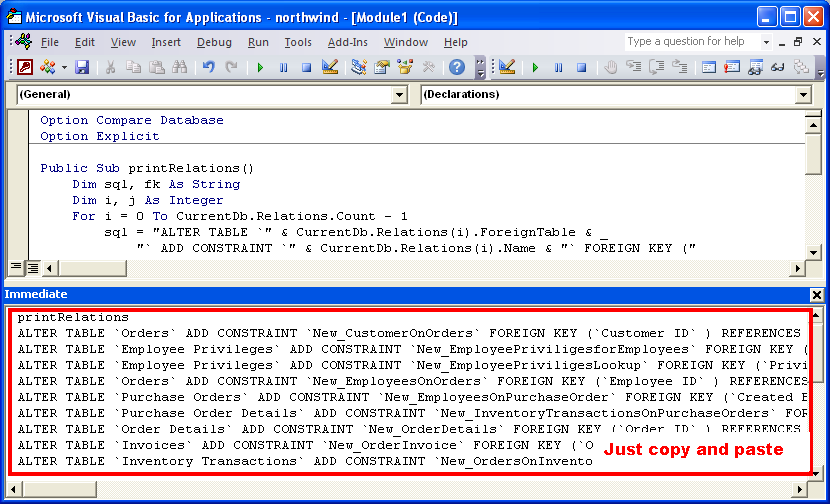
Enjoy!
(*)MySQL Migration Toolkit is discontinued but is still available from mirrors like:
http://mirrors.dotsrc.org/mysql/Downloads/MySQLGUITools/
10 Responses to Converting MS Access to MySQL with relationships